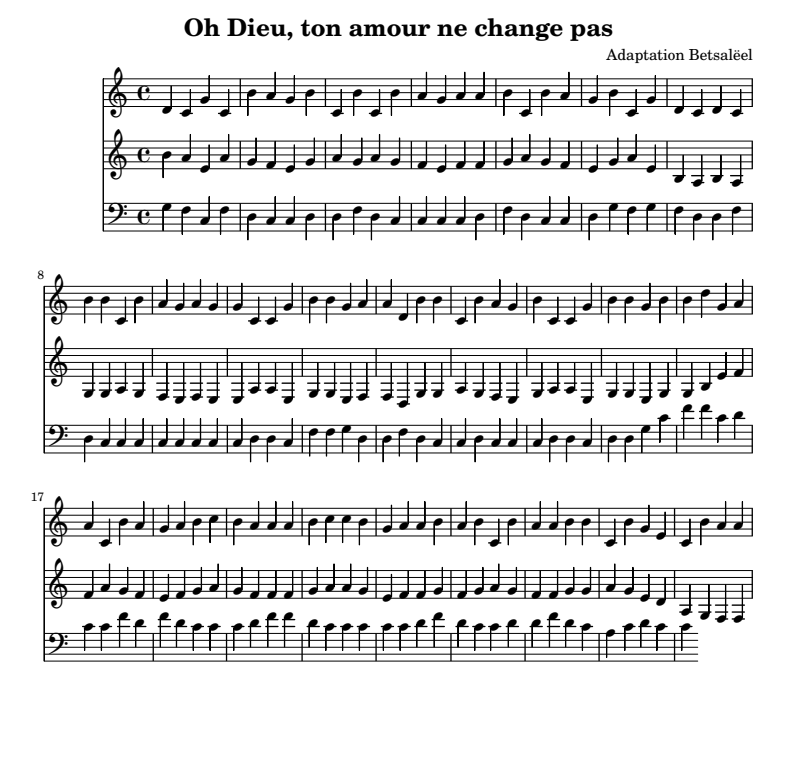
\version "2.24.0"
\header {
title = "Oh Dieu, ton amour ne change pas"
composer = "Adaptation Betsalëel"
}
soprano = \relative c'' {
\clef treble
\key c \major
\time 4/4
% Première phrase
d' c' g' c' b' a' g' b' c' |
b' c' b' a' g' a' |
a' b' c' b' a' g' b' c' g' |
d' c' d' c' b' b' c' b' a' g' a' g' g' |
% Refrain
c' c' g' b' b' g' |
a' a' d' b' b' c' b' a' g' b' |
c' c' g' b' b' g' |
b' b' d'' g' a' a' |
c' b' a' g' |
a' b' c'' b' a' a' |
a' b' c'' c'' b' g' a' a' b' a' |
b' c' b' a' a' b' b' c' b' g' e' |
c' b' a' a' |
}
alto = \relative a' {
\clef treble
\key c \major
\time 4/4
% Première phrase (tierce en dessous)
b a e a g f e g a |
g a g f e f |
f g a g f e g a e |
b a b a g g a g f e f e e |
% Refrain
a a e g g e |
f f d g g a g f e g |
a a e g g e |
g g b e f f |
a g f e |
f g a g f f |
f g a a g e f f g f |
g a g f f g g a g e d |
a g f f |
}
basse = \relative g {
\clef bass
\key c \major
\time 4/4
% Première phrase (quinte en dessous)
g f c f d c c d |
d f d c c c |
c d f d c c d |
g f g f d d f d c c c c c |
% Refrain
c c c d d c |
f f g d d f d c c d |
c c c d d c |
d d g c f f |
c d c c |
f d f d c c |
c d f f d c c c c c |
d f d c c d d f d c a |
c d c c |
}
\score {
<<
\new Staff = "Soprano" \soprano
\new Staff = "Alto" \alto
\new Staff = "Basse" \basse
\layout { }
\midi { }
}